Seamless and trouble-free payments to help you scale your business!

A dynamic platform for your business to accept digital payments through payment gateway, payment links and more. Use PayFast and experience the new era of payments.

Checkout

Fast, secure, and easy to use, our solution offers multiple payment options to cater to your customer’s preferred mode of making payments.

With our Checkout, you’re one step away from growing your business

Is PayFast Checkout for Me?

Built for all businesses, be it an e-commerce store, aggregator, or a marketplace looking to grow their revenue with an easy-to-integrate checkout payment solution.

Raast

What is Raast P2M?

Raast P2M is a fast and secure way to pay businesses directly through your mobile banking app, QR code scan, or Request to Pay (RTP) link. No cash needed!

How to pay via a Dynamic QR?

Login to PayFast and enter the transaction amount.
Direction Arrows
Step 01
Generate a unique QR code
Direction Arrows
Step 02
Customer scans & pays the exact amount with their banking app
Direction Arrows
Step 03
Get notified instantly when your customer pays.
Step 04

How to pay via a Static QR?

Login to PayFast and create a static QR code
Direction Arrows
Step 01
Customer scans the QR at any OTC with their banking app
Direction Arrows
Step 02
Get notified instantly when your customer pays.
Step 03

Request-To-Pay NOW

Customer selects Raast at Checkout
Direction Arrows
Step 01
Enters IBAN or Raast ID and click “Proceed”
Direction Arrows
Step 02
PayFast inititaes the secure payment
Direction Arrows
Step 03
Customer validates through their banking app
Direction Arrows
Step 04
You get notified instantly
Step 05

Request-To-Pay LATER

Generate a payment link in the PayFast Portal.
Direction Arrows
Step 01
Share the link with your customer via email.
Direction Arrows
Step 02
Customer selects Raast (Real-Time Payment) at checkout.
Direction Arrows
Step 03
Customer receive an RTP notification later through their banking app.
Direction Arrows
Step 04
Customer can pay up to 40 days after receiving the request.
Step 05

PayFast Payment Links

Are you looking for a hassle-free way to receive payments from your customers but don’t have a website or landing page?

There’s no need to worry anymore!

PayFast Payment Links will allow you to accept payments against your product or services by creating a unique payment link. It’s that simple!

Get Payments from Anywhere in Three Easy Steps:

Generate a customizable billing invoice against your product or services through our invoicing portal.

Send the payment link directly to the customer through email, SMS, Whatsapp or embed the link anywhere you prefer.

Add your payment frequency, be it one-time or recurring

Is PayFast Payment Links for Me?

Whether you’re a freelancer, homemaker, entrepreneur, or influencer starting off a venture and looking for an easy, fast, and secure payment solution for your growing business needs, you have nothing to worry about! We’ve got you covered!

Versatile Payment Acceptance

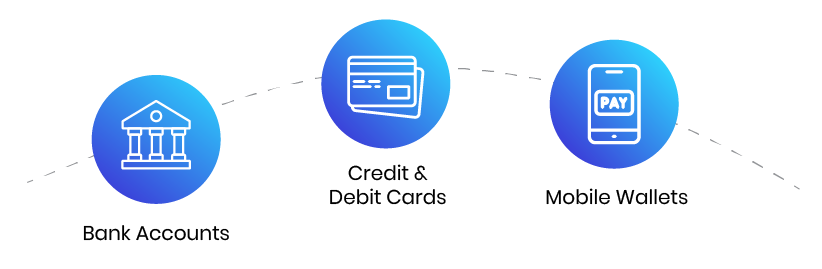
With the PayFast Payment Links solution your customers can make payments from a wide range of payment modalities:

How to generate an invoice?

Payment Links provides a customizable and easy to use interface that helps you send an invoice in a matter of seconds. Here’s how:

Log into your PayFast dashboard
Direction Arrows
Step 01
Go to Create Invoice
Direction Arrows
Step 02
Select your Customer and Invoice Reference ID
Direction Arrows
Step 03
Add minimum payable amount, if applicable
Direction Arrows
Step 04
Add total amount and GST
Direction Arrows
Step 06
Save and Send
Step 07

Billing

Managing, distributing, and collecting multiple bills and subscriptions at a large scale is tiring and at times, nearly impossible when you don’t have a robust payment solution to support the demands of your business.

We’ve made billing easier for you!

Is PayFast Billing for Me?

At PayFast we understand your organization's needs, be it accepting bills for corporate merchants, real estate, club membership fees, educational institute fee, or an NGO striving to collect donations by generating billing invoices to prospects. Not only that at PayFast we accept payments from mobile banking apps, internet banking, ATMs, branch banking, and many Over-The-Counter locations.

How Do Customers Pay Their Bills through PayFast Billing?

Log in to your bank's internet banking website or mobile app ​
Direction Arrows
Step 01
Select bill payments
Direction Arrows
Step 02
Select PayFast from the list of billers
Direction Arrows
Step 03
Enter your invoice number and amount
Direction Arrows
Step 04
Confirm payment
Step 06

Over-The-Counter Billing

You can make payments by going to one of our partner's OTC shops, showing them your invoice, and making the payment. You can view our list of OTC shops here.

Visit your nearest designated OTC store
Direction Arrows
Step 01
Share the consumer or invoice number of the bill with the OTC collector
Direction Arrows
Step 02
Provide the bill amount via cash to the collector
Direction Arrows
Step 03
your payment has been made
Step 04

Introducing: Payment via 1link

Billers partnered with us can allow their customers to make payments through 1link on our partner banks’ banking channels.

Log in to your bank's internet banking website or mobile app
Direction Arrows
Step 01
Select bill payments
Direction Arrows
Step 02
Select 1Bill from the list of billers
Direction Arrows
Step 03
Enter your Consumer number
Direction Arrows
Step 04
Confirm payment
Step 05

Mobile Payments

Powered by UnionPay International, we’ve revolutionized the payments landscape in Pakistan through the introduction of swift and seamless mobile payments.

Account holders with any of our partner banks can make purchases using QR and Tap & Pay!

qr-01

Introducing: Payment via 1link

Billers partnered with us can allow their customers to make payments through 1link on our partner banks’ banking channels.

Log in to your banking app
Direction Arrows
Step 01
Generate a Virtual Card
Direction Arrows
Step 02
Scan the QR or Tap on the Point-of-Sale (POS) Machine
Direction Arrows
Step 03
Confirm Amount and Payment
Step 04

Valid on the following partner banks